- Respond immediately with clear communication: Acknowledge the issue, apologize, and provide timely updates to maintain customer trust during a production incident.
- Stabilize quickly with a rollback or hotfix: Prioritize restoring service before optimizing the long-term fix.
- Run a root cause analysis (RCA): Use frameworks such as the 5 Whys or the Fishbone Diagram to identify system-level failures.
- Prevent future production bugs: Improve QA processes with better test coverage, cross-browser testing, and production-like environments.
- Turn incidents into trust-building moments: Transparent communication, post-mortems, and accountability can strengthen customer relationships after outages.

What Happens When a Bug Reaches Production?
It all starts with a random notification sound. Maybe it’s a high-priority ticket or a sudden spike on your monitoring dashboard. Your stomach drops. The application/product that passed all the tests to date has just blown up in the Prod environment. Nobody knows what went wrong.
No matter how mature your engineering organization is…
No matter how strong your QA process feels like…
No matter how many test cases you automate…
Bugs still reach production. "Zero bugs" is a vanity metric.
As leaders, our job isn't just to prevent fires. Sometimes to act as firefighters.
Customers don’t experience your sprint planning, your backlog constraints, or your internal planning. They experience what broke and how you respond. This is your playbook for turning a production failure into a lesson in customer trust QA.
What should you do when a bug reaches production?
When a bug reaches production, follow these four key steps:
• Communicate immediately with users (acknowledge, apologize, act)
• Stabilize the system with a rollback or hotfix
• Perform root cause analysis (RCA)
• Implement safeguards to prevent recurrence
Phase 1: Incident Response and Crisis Communication
We all get into the war room, that’s where the blame game starts. If you're unsure how to proceed, here’s a guide on how to handle bugs in production effectively.
“Bugs break Software. Silence breaks Trust.”
The hard part is communicating it to the client. After an initial analysis, it’s better to inform the client before they get to know via other sources.
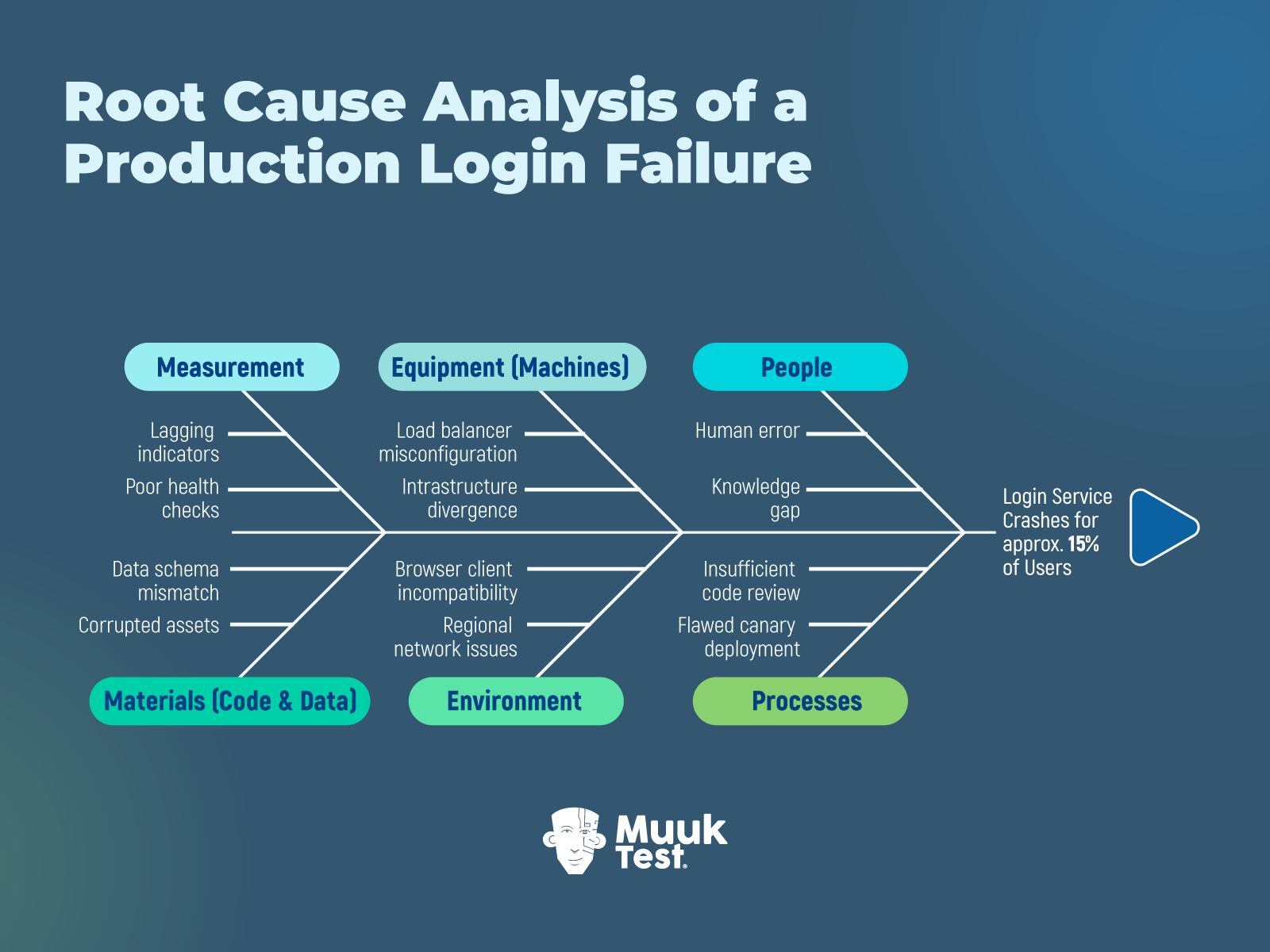
Imagine an example where the login crashes for around 15% of the users. You can issue a status update using the three A’s framework: Acknowledge, Apologize, and Act.
-
Acknowledge: "We are currently investigating an issue impacting login for a subset of users." This is the first step. Because the worst thing you can do is go silent while customers speculate.
-
Apologize: "We know this disrupted your business operations, and we are sorry for the frustration." Your apology matters, and be specific about it. It shows you grasp the real impact and empathize with them.
-
Act: "Our engineering team has identified the cause and is rolling back the recent deployment. Next update in 30 minutes." Providing the status in a timely interval buys you credibility and time. Even if there's no progress, make sure to provide the interim update.
This framework helps because you didn't promise any fixed time. You simply validated the customer's pain and acknowledged it. That is the first step as part of your bug recovery plan.
Real-Life Example: Slack’s Outage Communication
Slack teaches us the best way to handle downtime despite several frustrations and mockery online. Customer sentiment remained surprisingly positive despite hours of downtime. You can read more about Slack's major incident here.
Along with this, my personal suggestion is to document everything in real-time. In the chaos, you will expect to remember the details. But you won't. So, create a shared incident timeline from minute one. This becomes invaluable for your post-mortem and for explaining what happened to executives and customers.
Phase 2: Fixing the Production Bug (Rollback vs Hotfix)
For instance, in some cases, the rollback helps. Now the login works.
In some instances, code fix to be performed, tested, and deployed. The temptation is to close the incident and shut down. It doesn’t end here.
When a simple fix is not enough
If the bug was a minor UI glitch, a simple "Fixed" notification works. But if you lost customer data or caused downtime that impacted their revenue, an apology isn't enough. You need to compensate financially, at least to some extent. This will help you maintain NPS scores post-incident because customers felt the company had skin in the game.
Why public post-mortems build credibility
Transparency is a superpower. Write a detailed human report (not a defensive one). I personally like how Slack is publishing detailed blog posts explaining exactly what went wrong after the outages. It’s worth mentioning GitHub’s availability report. Last year, I found that GitHub was publishing a monthly report of post-incident reviews for major incidents that impact service availability. It explains the technical issues, hours impacted, mitigation plan, and the solution. You can read a post-mortem sample edition here.
Your technical customers (CTOs/VPs) will respect honesty. It proves you understand your own system.
Phase 3: The Autopsy (Root Cause Analysis for Production Bugs )
Once stability is restored, the next step is understanding. This is where QA process improvement actually happens. Root Cause Analysis (RCA) to be performed without blaming or making it a courtroom.
Using the "5 Whys" to identify system failures
When the checkout button didn't work in Safari.
- Why? The CSS grid property wasn't supported.
- Why? The developer only tested on Chrome Desktop. (Don’t stop here)
- Why? We don't have mobile emulators in our CI/CD pipeline.
- Why? It was deemed "too expensive" last quarter.
- Why? There is no clear prioritization of testing based on real user risk or production impact.
So here the real fix isn’t just to “test more.” You need to close the gap between what your team can test and what actually reaches production. This is where solutions like MuukTest come in. By combining AI-driven test generation with experienced QA engineers, MuukTest helps teams continuously validate critical user flows across browsers, devices, and environments—without adding maintenance overhead. The result is faster feedback, more reliable coverage, and fewer production surprises, especially in the edge cases traditional setups tend to miss.
Fishbone diagram (Ishikawa) for incident analysis
The typical categories of causes include:
- People (human factors)
- Processes (procedures and workflows)
- Equipment (tools and machines)
- Materials (inputs or raw materials)
- Environment (working conditions)
- Measurement (data and metrics)
Based on the login example quoted above, this is how your diagram looks:
The Swiss Cheese Model: Why failures stack
When the failure happens from multiple layers:
- Code review missed it
- Automation didn’t cover it
- Monitoring didn’t alert early
- Release gate didn’t stop it
Production bugs are rarely one hole. They are aligned holes.
Phase 4: Strategic Improvement
You need to implement guardrails; they help you to keep moving.
Few Practical Examples:
- Feature Flags: Instead of a “fancy”, hefty release, wrap the new code in a feature flag. Roll it out to 5% of users. If something's off, you toggle it off instantly without a full rollback.
- Canary Deployments: Automate your load balancer to route traffic to the new build slowly.
- Staging vs. Prod Parity: If the bug happened because Staging uses 10MB of data and Prod uses 10TB, your process improvement goal is to replicate PROD in terms of Infra, config, and Data Load.
Why psychological safety improves software quality
All of this anxiety, blame, extra work hours, and sleepless nights are too much for the team to handle. As Engineering leaders, we must protect culture and team harmony.
“High-performing QA organizations don’t just build test suites. They build safe work environments.”
Always remember that a safe team is an innovative team.
How to Build Customer Trust After a Production Incident
Production bugs don't have to be life-threatening every time. When handled with transparency, accountability, and a genuine commitment to improvement, they can strengthen trust.
Start tomorrow by auditing your incident response readiness. Do you have communication templates and channels ready? Does everyone know their role during an outage? Can you trace a bug from detection through resolution?
Then look at your prevention mechanisms. Where are your testing gaps? What monitoring blind spots exist? How quickly can you roll back a bad deployment?
Finally, examine your culture. Can people admit mistakes without fear? Are you learning from mistakes and documenting them? Are you keeping track of the lessons learned?
“Quality isn’t proven when everything works. It’s proven by how you respond when it doesn’t.”
Best of luck in managing that production defect 🙂
References:
-
https://github.blog/news-insights/company-news/introducing-the-github-availability-report/
-
https://slack.engineering/a-terrible-horrible-no-good-very-bad-day-at-slack/
-
https://www.callcentrehelper.com/goodwill-gestures-better-customer-relationships-219934.htm
-
https://quality-one.com/rca/root-cause-analysis-and-fishbone-diagrams/

FAQs
What should you do when a bug reaches production?
When a bug reaches production, teams should act quickly to minimize impact. The first step is to communicate transparently with users, followed by stabilizing the system through a rollback or hotfix. After resolution, teams should conduct a root cause analysis (RCA) and implement safeguards to prevent similar issues in the future.
How do you handle a production outage effectively?
Handling a production outage requires a structured incident response process. This includes detecting the issue quickly, assessing its impact, communicating updates to users, restoring service through fixes or rollbacks, and conducting a post-mortem to identify and address root causes.
Why do bugs still reach production despite testing?
Bugs reach production due to gaps in test coverage, environment differences between staging and production, and untested edge cases such as cross-browser or device-specific scenarios. In many cases, the issue is not a lack of testing effort but limitations in testing strategy, tooling, or prioritization.
What is root cause analysis (RCA) in software testing?
Root cause analysis (RCA) is a structured process used to identify the underlying reasons behind a production issue. Instead of focusing only on the immediate error, RCA techniques like the 5 Whys or Fishbone Diagram help teams uncover systemic problems in processes, tools, or decision-making.
What is the difference between a rollback and a hotfix?
A rollback restores the system to a previous stable version, making it the fastest way to recover from a failed deployment. A hotfix, on the other hand, involves applying a targeted fix to the current version. Rollbacks prioritize speed, while hotfixes are used when reverting is not feasible.
How can teams prevent bugs from reaching production?
Preventing production bugs requires a combination of strong QA processes, continuous testing, and production-like environments. Practices such as cross-browser testing, automated regression testing, feature flags, and canary deployments help teams detect issues earlier and reduce risk during releases.